Contract accounting flow
Related information
 Related topics
Sage Intacct's Contracts application has the flexibility to allow you to recognize revenue when you want, according to your business process. In a given revenue period, some companies might invoice first and then recognize revenue, other companies might recognize revenue first and then invoice. Additionally, receiving a payment can occur at any point in the contract accounting workflow.
A typical revenue recognition accounting process uses three accounts: Accounts Receivable, Deferred Revenue, and Sales Revenue. In order to cover all possible event timing scenarios, Contracts uses eight accounts in three categories: Unbilled, Billed, and Paid
| Unbilled | Billed | Paid |
|---|---|---|
| Accounts Receivable | Accounts Receivable | <Cash>* |
| Deferred Revenue | Deferred Revenue | Deferred Revenue |
| Sales Revenue | Sales Revenue | Sales Revenue |
* Although part of the revenue recognition process, the Cash account is not specific to Contracts.
In order to be ASC 606 compliant, companies are required to disclose the state of contracts (or category of contract) as having either recognized revenue greater than cash collected (contract asset), or recognized revenue less than cash collected (contract liability). Contracts is designed so your financial statements can potentially separate out each line item of each contract into the various GL accounts when revenue is in a particular state.
Unbilled Deferred Revenue acts as a contra account to Unbilled AR in the asset section of the balance sheet so that the unbilled accounts have no effect on the balance sheet until Unbilled Sales Revenue is recognized. That event reduces Unbilled Deferred Revenue, so Unbilled AR only appears on the balance sheet when Unbilled Sales Revenue is posted. This correctly shows unbilled AR only when unbilled revenue is recognized.
When payment is received prior to revenue recognition, the amounts may need to be recorded as a contract liability. You can analyze the status of Paid Deferred Revenue, Paid Sales Revenue accounts, and Unbilled Sales Revenue and Unbilled will show the net contract asset/liability positions.
The Billed AR, Billed Deferred Revenue, and Billed Sales Revenue accounts are for amounts that are neither unbilled nor paid.
Data flows between these accounts based on posting events, which are:
- On create: the GL entry is posted when the contract line is first posted. This constitutes the contract booking.
- On recognition: the GL entry is posted when revenue is posted for the contract line.
- On invoice: the GL entry is posted when the contract line is invoiced.
- On payment: the GL entry is posted when payment is applied to the invoice containing the contract line.
- On MEA: the GL entry is posted when the MEA allocation is created. This is only applicable to Advanced Contract Revenue Recognition.
When an event occurs, the system automatically reclassifies entries where applicable to move them to the appropriate type of account (Accounts Receivable, Deferred Revenue, Sales Revenue) for the applicable condition (Unbilled, Billed, or Paid). If you are using dual-book reporting, the events will post twice—once in each revenue recognition journal.
The following examples show how the data flows between accounts according to the timing of the event.
Example 1 - Invoice before revenue recognition
In this example, there is a contract line for $1,200 with a twelve-month term. The invoices occur quarterly, with the first invoice at the beginning of the contract. Revenue is recognized monthly via the straight line method.
| Month | Event | Unbilled AR | Billed AR | Paid AR/Cash | Unbilled Deferred | Billed Deferred | Paid Deferred | Unbilled Sales | Billed Sales | Paid Sales |
|---|---|---|---|---|---|---|---|---|---|---|
| March | Save (Book) the contract line | Debit 1200 | Credit 1200 | |||||||
| April | Generate Invoice for the 1st quarter | Debit 300 | Credit 300 | |||||||
| (System reverses Unbilled) | Credit 300 | Debit 300 | ||||||||
| April | Post one month of revenue | Debit 100 | Credit 100 | |||||||
| May | Receive payment | Credit 300 | Debit 300 | |||||||
| (System posts to Paid accounts) | Credit 200 | Credit 100 | ||||||||
| (System reverses Billed revenue recognition) | Debit 200 | Debit 100 | ||||||||
| May | Post one month of revenue | Debit 100 | Credit 100 | |||||||
| Balance | 900 | 0 | 300 | 900 | 0 | 100 | 0 | 200 |
Example 2 - Revenue recognition before invoice
In this example, there is a contract line for $1,200 with a twelve-month term. The invoices occur quarterly, with the first invoice at the end of the first quarter of the contract. Revenue is recognized monthly via the straight line method.
| Month | Event | Unbilled AR | Billed AR | Paid AR/Cash | Unbilled Deferred | Billed Deferred | Paid Deferred | Unbilled Sales | Billed Sales | Paid Sales |
|---|---|---|---|---|---|---|---|---|---|---|
| March | Save (Book) the contract line | Debit 1200 | Credit 1200 | |||||||
| April | Post one month of revenue | Debit 100 | Credit 100 | |||||||
| May | Post one month of revenue | Debit 100 | Credit 100 | |||||||
| June | Post one month of revenue | Debit 100 | Credit 100 | |||||||
| July | Generate invoice for the 1st quarter | Debit 300 | Credit 300 | |||||||
| (System reverses Unbilled) | Credit 300 | Debit 300 | ||||||||
| (System recognizes in Billed) | Debit 300 | Credit 300 | ||||||||
| July | Receive payment | Credit 300 | Debit 300 | |||||||
| (System posts to Paid accounts) | Debit 300 | Credit 300 | ||||||||
| Balance | 900 | 0 | 300 | 900 | 0 | 0 | 0 | 300 |
Example 3 - Revenue recognition with MEA
In this example, there is a contract line for $1,200 with a twelve-month term. The invoices occur quarterly, with the first invoice at the beginning of the contract. Revenue is recognized monthly via the straight line method.
When the contract starts in March, this contract line participates in an MEA allocation with one other contract line, which results in additional revenue for this contract line. In May, an add on to the contract requires a second MEA allocation that takes away revenue from the contract line. Example amounts are rounded to simplify the display.
| Month | Event | Unbilled AR | Billed AR | Paid AR/Cash | Unbilled Deferred | Billed Deferred | Paid Deferred | Unbilled Sales | Billed Sales | Paid Sales |
|---|---|---|---|---|---|---|---|---|---|---|
| March | Save (Book) the contract line | Debit 1200 | Credit 1200 | |||||||
| March | Create MEA allocation | Debit 267 | Credit 267 | |||||||
| March | Generate Invoice for the 1st quarter | Debit 300 | Credit 300 | |||||||
| (System reverses Unbilled) | Credit 300 | Debit 300 | ||||||||
| March | Post one month of revenue | Debit 122 | Credit 122 | |||||||
| April | Post one month of revenue | Debit 122 | Credit 122 | |||||||
| May | Create 2nd MEA allocation | Credit 53 | Debit 53 | |||||||
| (System reverses 1st allocation) | Credit 267 | Debit 267 | ||||||||
| May | Receive payment | Credit 300 | Debit 300 | |||||||
| (System posts to Paid Deferred Revenue) | Debit 56 | Credit 56 | ||||||||
| (System posts to Paid Sales Revenue) | Debit 244 | Credit 244 | ||||||||
| May | Post one month of revenue (MEA amount=95) + (one-time adjustment amount= -53) | Debit 42 | Credit 42 | |||||||
| Balance | 847 | 0 | 300 | 847 | 0 | 14 | 0 | 0 | 286 |
Where to see contract posting events
You can view the transaction history for a contract or contract line via the Transaction History tab.
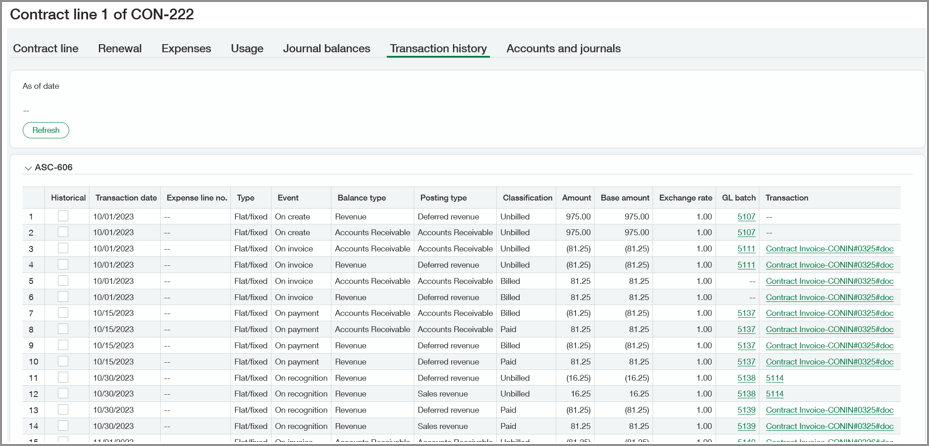
When accessed from the contract, the Transaction history tab displays the entire debit/credit history for the contract for each journal. When accessed from the contract line, this tab displays the debit/credit history for just the selected contract line. To view transaction history as of a certain date, enter a date in the As of date field and select Refresh.
There are two journal entries associated with each line/event combination. Auditors can use this information to verify the reclassification of Deferred Revenue, Sales Revenue, Accounts Receivable, and Expense GL entries.
Learn more about the Transaction history tab.
Where to see account balances
You can view the current Unbilled, Billed and Paid balances for your Accounts Receivable, Deferred Revenue, and Sales Revenue accounts in the Journal balances tab. You can access this tab from the contract or contract line.
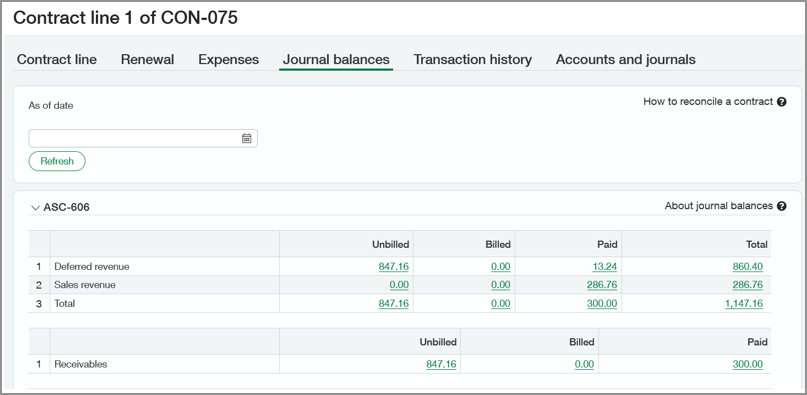
The Journal Balances tab shows the balances for both revenue recognition journals. To view a GL report that shows a breakdown of an amount by each account, select the link in a desired column. From the report, you can drill-down to a specific journal entry.
Learn more about the Journal balances tab.
