Expenses
Time and Expenses split into two applications
Previously, Time and Expenses was a single application. Time and Expenses is split into two individual applications: Time and Expenses. The subscription still includes both applications but you access them using dedicated menus.
This change ensures that features are easier to find and navigate, providing a smoother experience with Sage Intacct.
Enable Time subscription
Go to Company > Admin tab > Subscriptions.
Toggle on Time and Expenses.
If you were subscribed to the Time and Expenses application, you now access Time features in the new Time application and the Expenses features in the new Expenses application.
Assign new permissions to roles and users
The Time and Expenses applications each have their own separate set of permissions. Assign the appropriate permissions to users so that they can complete tasks related to each application. Learn more about Application permissions.
Previously, you could assign the following permissions in both of the Projects and Time and Expenses applications: My timesheets, Staff timesheets, Approve timesheets, Timesheet rules, and Time types
If you assigned permissions in the Projects application only, then those permissions have transferred to the Time application successfully.
If you assigned permissions in the Time and Expenses application only, then those permissions have transferred to the Time application successfully.
If you assigned permissions in both of the Projects and Time and Expenses applications, then ensure that the correct permissions have transferred to the Time application.
Assign Expenses permissions to roles
Go to Company > Admin > Roles.
Find the role and select Subscriptions.
Find the Expenses application and select Permissions.
Select the checkboxes for the activities and reports to access.
Select Save.
Select Save again.
Assign Expenses permissions to users
Go to Company > Admin > Users.
Find the user and select Subscriptions.
Find the Expenses application and select Permissions.
Select the checkboxes for the activities and reports to access.
Select Save.
Select Save again.
Menu changes
Time and Expenses now each have their own dedicated menus. Some features previously found under the Projects menu have been relocated to either the Time or Expenses menus.
Time menu
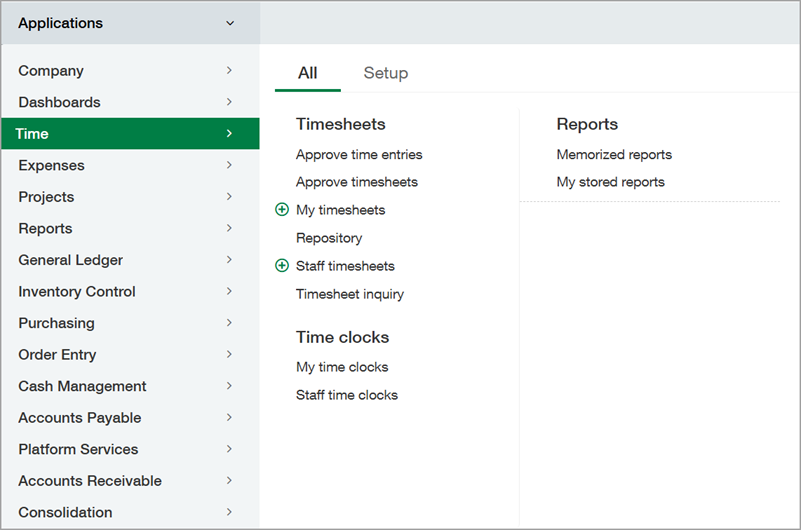
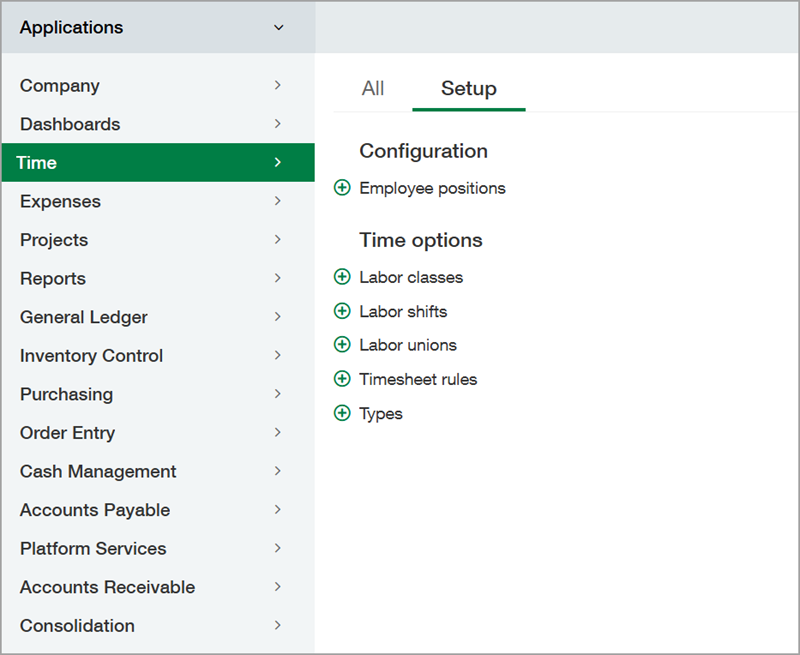
On the Time menu, you can find the following features on the All tab and the Setup tab.
My timesheets
Staff timesheets
Timesheet inquiry
Approve timesheets
Reports
Approve time entries (with Sage Intelligent Time enabled)
Repository (with Sage Intelligent Time enabled)
My time clocks (with Sage Intelligent Time enabled)
Staff time clocks (with Sage Intelligent Time enabled)
Timesheet rules
Time types
Configuration
Time sources (with Sage Intelligent Time enabled)
Time preferences (with Sage Intelligent Time enabled)
Employee positions (with the Construction subscription)
Labor classes (with the Construction subscription)
Labor shifts (with the Construction subscription)
Labor unions (with the Construction subscription)
Expenses menu
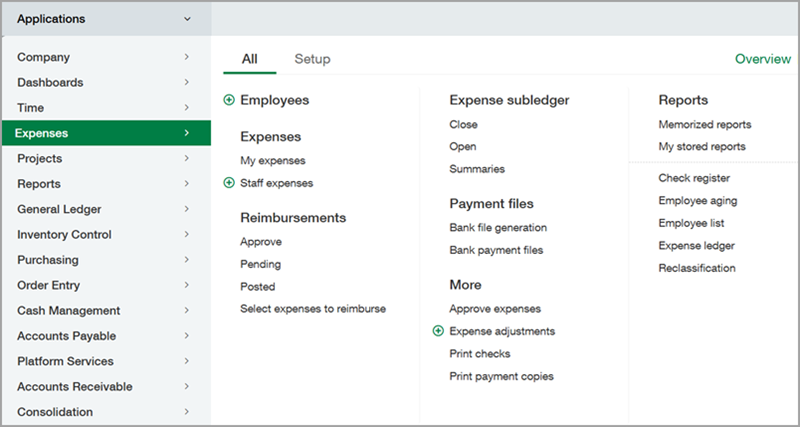
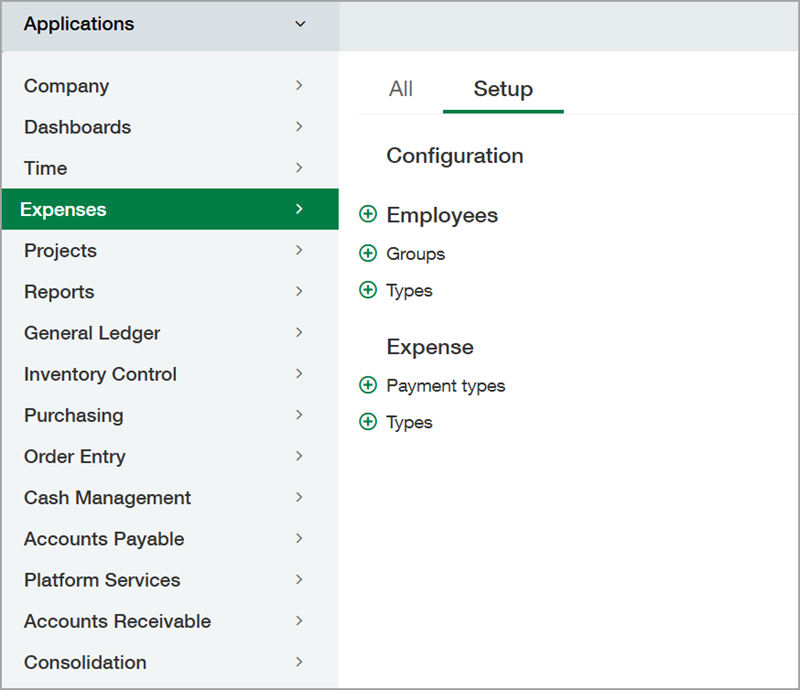
On the Expenses menu, you can find the following features on the All tab and the Setup tab.
Employees
My expenses
Staff expenses
Approve expenses
Expense adjustments
Approve reimbursements
Pending reimbursements
Posted reimbursements
Expense reimbursements
Close expense subledger
Open expense subledger
Expense subledger summaries
Bank file generation
Bank payment files
Print checks
Print payment copies
Advances
Reports
Employee groups
Employee types
Expense payment types
Expense types
Configuration
Projects menu
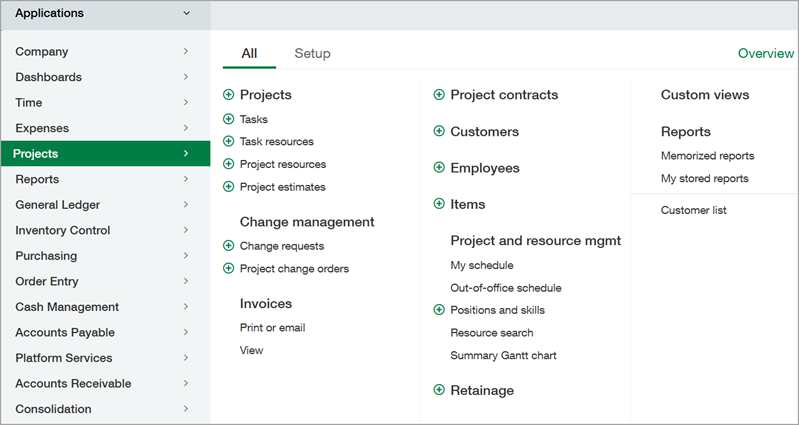
On the Projects menu, you can find the following features on the All tab and the Setup tab.
Projects
Tasks
Task resources
Project resources
Project estimates
AR sales invoices
Customers
Employees
Items
My schedule
Out-of-office schedule
Positions and skills
Resource capacity
Resource search
Summary Gannt chart
Retainage
Reports
Change request (with the Construction subscription)
Project change orders (with the Construction subscription)
Project contracts (with the Construction subscription)
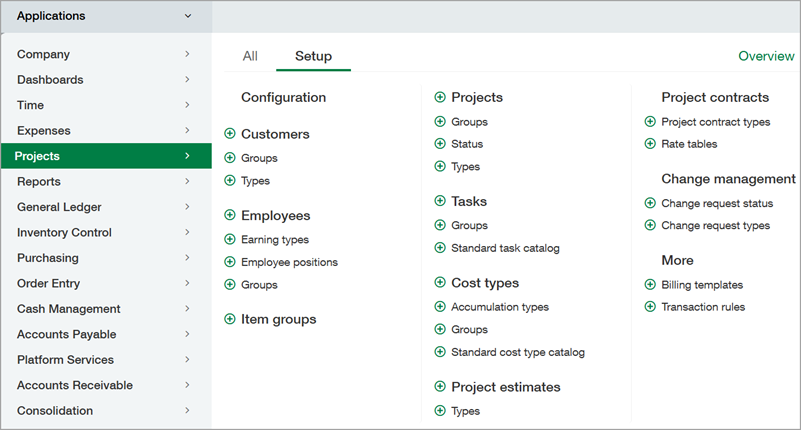
Customer groups
Customer types
Earning types
Employee positions
Employee groups
Item groups
Project groups
Project status
Project types
Task groups
Standard task catalog
Project estimates
Task types
Estimate types
Transaction rules
Configuration
Billing templates
Transaction rules
Cost types (with the Construction subscription)
Accumulated types (with the Construction subscription)
Cost type groups (with the Construction subscription)
Standard cost type catalog (with the Construction subscription)
Project contract types (with the Construction subscription)
Rate tables (with the Construction subscription)
Change request status (with the Construction subscription)
Change request types (with the Construction subscription)
Permissions and other requirements
| Subscription | Time and Expenses |
|---|---|
| Regional availability | All regions |
| User type | Business user with admin privileges |
| Permissions | Administration
|
