company and Administration
Updates to the Sage Intacct import service
Importing data is a critical function for accountants and partners, and we’re making it easier than ever with the new import service. Instead of sending your data into a black box and waiting for error reports via email, you now have a dedicated import workspace that provides real-time visibility and control.
Key benefits
The new import service provides the following benefits:
Expanded capabilities: Use spreadsheets with multiple tabs, use columns of calculations in your spreadsheets, and then skip those calculation columns during import.
Real time error handling: Any errors that the import service encounters are displayed in your worksheet at the field and line level with easy to understand error messages.
Intuitive interface: The import service worksheet tools allow you to quickly find and replace specific values, filter by errors, and copy and paste the correct information into the worksheet all before importing.
With an intuitive, spreadsheet-like interface, you can import files, see errors at the field level, and make corrections on the spot, eliminating frustration and saving time. The new import service is now generally available for a limited set of import types. It redefines the way that you manage imports ensuring efficiency, accuracy, and ease of use.
Details
On the Company Setup Checklist page, you’ll see a New import service link at the top of the page. Select the link to open the import service workspace.
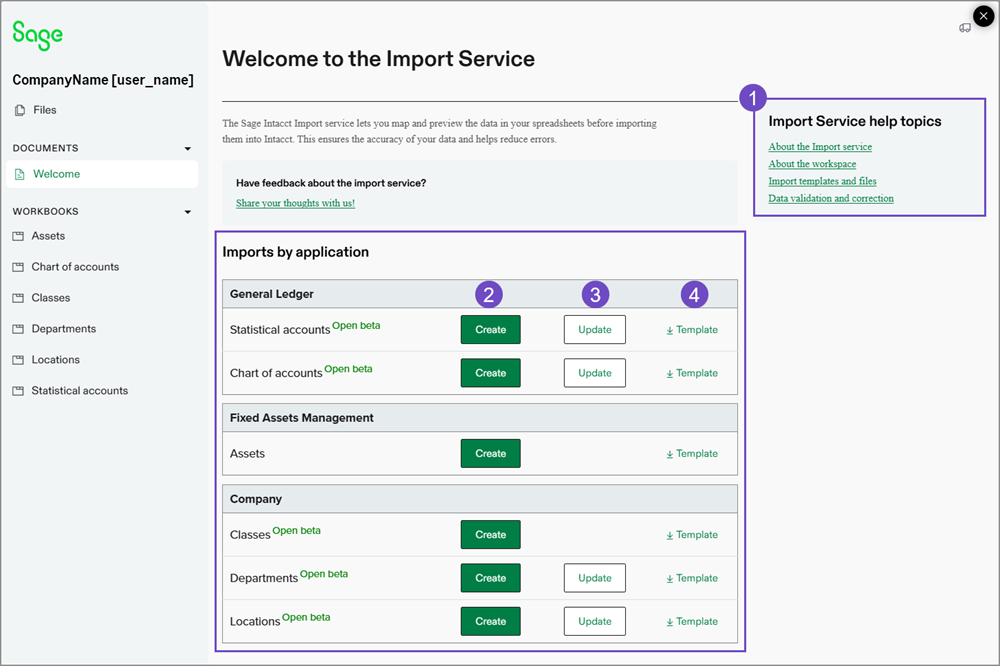
Import service help topics.
If you have questions about the import service, use these links to find answers.
Links to Create for available imports.
You can start the Create process from the welcome page. Select Create to add new records to Intacct.
Links to Update lines for available imports.
You can update existing records with the Update process. Select Update for the import that you want to work on.
Create and update are now two separate processes in the import service. When updating existing information, only include the records to be updated in the import file.Templates available for imports.
Download a template for the import that you want to work on. Add your data to the template and then follow the import process.
Available imports
The following areas of Intacct can use the import service for the listed import options.
Accounts Payable
| Import | Create | Update | Status |
|---|---|---|---|
| Supplier | Yes | No | Limited beta |
| AP purchase invoices | Yes | Yes | Limited beta |
Accounts Receivable
| Import | Create | Update | Status |
|---|---|---|---|
| Customers | Yes | Yes | Open beta |
Company
| Import | Create | Update | Status |
|---|---|---|---|
| Classes | Yes | No | General availability |
| Departments | Yes | Yes | General availability |
| Locations | Yes | Yes | General availability |
| Entities | Yes | Yes | Limited beta |
| Contacts | Yes | Yes | Limited beta |
General Ledger
| Import | Create | Update | Status |
|---|---|---|---|
| Chart of accounts | Yes | Yes | General availability |
| General Ledger journal entries | Yes | No | Limited beta |
| Statistical accounts | Yes | Yes | General availability |
| Budgets | Yes | Yes | Limited beta |
Fixed Asset Management
| Import | Create | Update | Status |
|---|---|---|---|
| Assets | Yes | Yes - New | General availability |
WIP Management
| Import | Create | Update | Status |
|---|---|---|---|
| WIP schedule project | No | Yes | Open beta |
Inventory Control
| Import | Create | Update | Status |
|---|---|---|---|
| Warehouses | Yes | Yes | Open beta |
Join our Limited Beta program
We invite you to explore the new capabilities of our imports in limited beta.
Your insights are incredibly valuable. By signing up via the form linked below, you'll not only get early access but also have the opportunity to directly shape the future of this feature. After you try it out, we'd love to hear your feedback!
Sign up for limited beta access here.
How it works
Go to Company > Setup > Import data.
Select New import service at the top of the Company Setup Checklist.
Select the Intacct area to import into.
Upload your file to the import service workspace.
If your file has tabs, select a tab to import first. The import service only imports information one tab at a time.
Map fields and field values in your spreadsheet to Intacct fields.
The mapping between fields and the values that populate those fields is important for the accuracy of your upload.
Validate or correct data as needed.
When all errors are resolved on your import sheet, you can import the data into Intacct.
Below is an example of an error message that you might see in the import service before import.
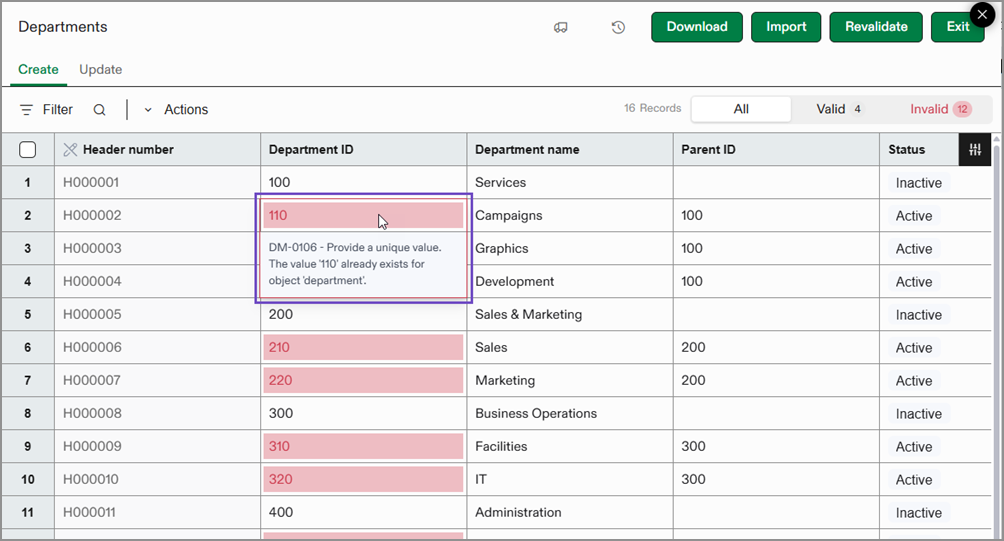
Select Import to import the data into Intacct.
Permissions and other requirements
| Subscription | Company |
|---|---|
| Regional availability | All regions |
| User type | Business |
| Permissions | Company Setup Checklist: Run You’ll also need permission to access the specific applications of Sage Intacct where you want to import data. |
