time
Set default values to appear on timesheets—Sage Intelligent Time
Administrators can set default values on employee records so that those values appear on timesheets automatically using Sage Intelligent Time (SIT). Set default values for each employee to ensure consistent and accurate data entry and reporting.
Key benefits
Values populate on timesheets automatically
Enter data quickly
Reduce manual errors
Enhance data integrity and compliance
How it works
Go to Time or Expenses > All > Employees.
Find the employee and select Edit.
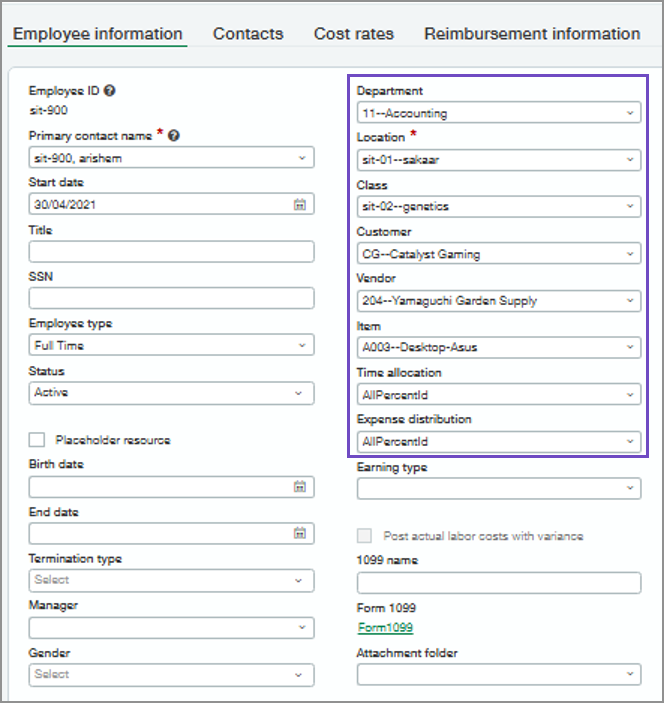
Select dimensions to populate on the employee timesheet.
You can select the following dimensionsCustomer
Supplier
Item
Time allocation
Expense distribution
Department
Location
Class
Select Save.
What's changed
The following are new dimensions on the Employee information page:
Customer
Supplier
Item
Time allocation
Expense distribution
Good to know
When an employee creates a timesheet, default values populate automatically based on their employee record. If a project is selected, the timesheet will instead use the project's default values, which override the employee defaults.
Permissions and other requirements
| Subscription | A subscription to at least one of the following Sage Intacct applications is required:
|
|---|---|
| Regional availability |
|
| User type | Business |
| Permissions | Time or Expenses
|
| Configuration |
