Purchasing
Line-level matching for AP Automation—General availability
Line-level document matching introduces a more precise way to automate transaction processing with AP Automation with Purchasing. For line-level matching, AI does the following:
Matches the supplier document to the source Purchasing transaction.
Populates line items in the target transaction using data from the uploaded or emailed supplier document, rather than the source transaction.
Flags any differences found in terms of price or quantity between the supplier invoice and the source transaction.
Key benefits
Strengthen your purchasing process with intelligent 3-way matching between purchase orders, receivers, and vendor invoices while eliminating the need to convert transactions manually.
Quickly identify AI-flagged discrepancies in quantity or price between the automated transaction and source transaction, allowing you to determine and resolve line variations and unexpected lines.
Minimize review effort on minor differences with match tolerance thresholds.
How it works
Go to Purchasing > Setup > Configuration.
Select Override header-level matching with line-level matching.
Select Save.
Continue emailing and uploading documents for processing.
View a summary of exceptions when there are discrepancies between matched transaction lines. For example, the purchase order has an item price of $5, but the PO purchase invoice charged you $8 for that item.
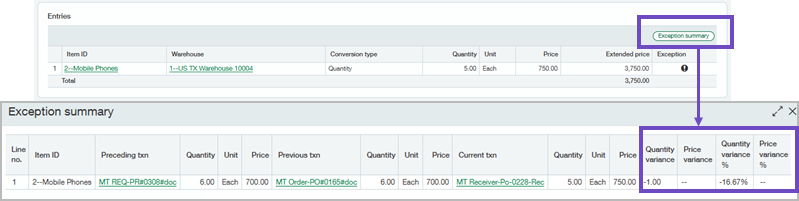
Select View exceptions to see the discrepancy summary when AI flags lines that do not match.
Edit the automated transaction lines or post the exceptions as needed.
Permissions and other requirements
| Subscription | Purchasing Accounts Payable AP Automation Sage Cloud Service |
|---|---|
| Regional availability | All regions |
| User type | Upload transactions for Purchasing automation
View, edit, and post automated transactions
Move a draft transaction to the Accounts Payable workflow
|
| Permissions | Accounts Payable (to change a draft transaction to an AP AP purchase invoice)
Purchasing (to view or edit the automated transactions)
|
| Configuration |
|
